








Bugs are cheapest to fix before code runs. Static code analysis tools make that possible: they inspect source code for bugs, security flaws, and style violations without running it, catching defects before release.
This guide compares seven of the best options for 2026: SonarQube, Semgrep, CodeQL, PMD, ESLint, Snyk Code and Coverity. It shows which are free, what each costs when you outgrow the free tier, walks through a real-world failure (Heartbleed) and explains how to choose.
What Does Static Code Analysis Actually Do?
It reads your code without executing it, applies rules or data-flow reasoning, and flags risky patterns early, when fixes are cheapest.
How do these scanners find problems?
Most parse code into an abstract syntax tree (AST) and match rules against it. Deeper engines add taint tracking, which follows untrusted input across functions until it reaches a dangerous call.
Linter, code-quality platform or SAST?
- Linter: checks style and simple bugs. Example: ESLint.
- Code-quality platform: tracks bugs, code smells and technical debt. Examples: SonarQube, PMD.
- SAST (static application security testing): hunts security vulnerabilities. It is the security-focused branch of static analysis. Examples: CodeQL, Semgrep, Snyk Code, Coverity.
Why Should Teams Use Static Code Analysis?
Because it finds whole classes of defects automatically, before testing or production, and enforces the same standard on every commit.
What are the benefits?
-
Earlier detection: flaws surface while code is still cheap to change.
-
Consistency: rules apply equally to every developer and every pull request.
-
Compliance: static code analysis security findings map to standards such as the OWASP Top 10.
-
Scale: thousands of files are scanned in minutes.
What are the limitations?
Scanners produce false positives and cannot see runtime behaviour or business-logic flaws. Treat results as strong signals that still need human review.
Which Are the 7 Best Static Code Analysis Tools Worth Using?
SonarQube fits all-round quality, Semgrep suits custom rules, CodeQL secures GitHub projects, PMD serves Java, ESLint covers JavaScript, Snyk Code offers developer-first SAST, and Coverity handles deep C/C++ analysis. Pricing changes often, so confirm current figures on each vendor's page.
|
Tool |
Best for |
License |
Free option |
Paid option |
|
SonarQube |
Quality plus security |
Open-source core, paid editions |
Community Build |
Developer, Enterprise and Data Centre editions, priced by lines of code |
|
Semgrep |
Custom rules, fast CI |
Open-source engine |
OSS command line |
Paid Semgrep Code and Supply Chain plans; free for small teams |
|
CodeQL |
Deep security queries |
Engine free for public repos |
Public repositories |
GitHub Code Security license for private repos |
|
PMD |
Java and Apex |
Open source |
Fully free |
None needed |
|
ESLint |
JavaScript |
Open source |
Fully free |
None needed |
|
Snyk Code |
Developer-first SAST |
Commercial |
Free plan: 100 Snyk Code tests per month |
Team plan from $25 per contributing developer per month; Enterprise by quote |
|
Coverity |
Safety-critical C/C++ |
Commercial |
Coverity Scan (open-source projects) |
Commercial license; contact Black Duck for pricing |
1. SonarQube
The best all-rounder. The free Community Build covers 20+ languages but analyses only the main branch. Paid editions reach 35+ languages and add branch and pull request analysis, plus deeper security features such as taint analysis (which edition includes what varies, so check before you buy).
2. Semgrep
Best for custom rules. It matches code at the AST level, so rules look like the code you are searching for. Semgrep Code supports 35+ languages, and the open-source engine runs from the command line.
3. CodeQL
Best for GitHub-hosted projects. It treats code as queryable data, ships with ready-made query suites for common languages, and the CLI is free on public repositories. Private repositories need a GitHub Code Security license.
4. PMD
Best for Java and Apex teams. It bundles 400+ built-in rules, supports 16 other languages, and includes a copy-paste detector. Rules can be written in Java or XPath.
5. ESLint
Best for JavaScript and JSX. Every rule is pluggable, many problems auto-fix, and it runs in editors and CI pipelines.
6. Snyk Code
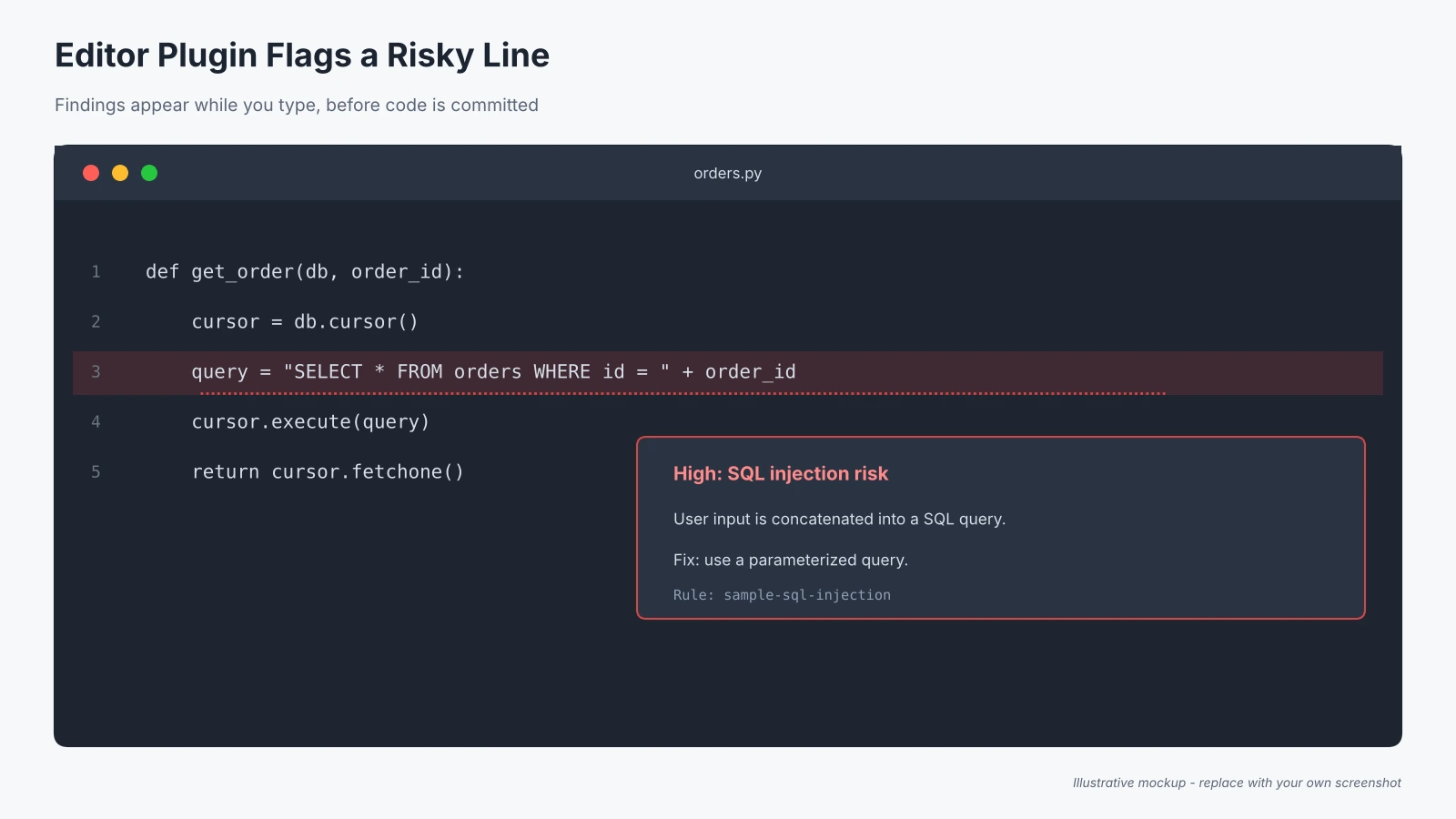
Best for developer-first SAST. IDE plugins deliver findings while you type. The free plan includes 100 Snyk Code tests per month, which a busy CI pipeline can use up quickly.
7. Coverity
Best for safety-critical C/C++. Its interprocedural data-flow engine covers 22 languages and 200+ frameworks, with MISRA, AUTOSAR and ISO 26262 reporting. It is now sold by Black Duck (formerly Synopsys).
How were these tools selected?
We shortlisted static code analysis tools by language coverage, analysis depth, license, free availability and CI fit, using official documentation and project repositories (linked in Sources).
Screenshot 1: Replace with a side-by-side capture of the tool dashboards you tested.
How Do You Choose the Right Tool?
Match the tool to your languages, analysis depth, budget and workflow.
What should you compare before buying?
Before comparing static code analysis tools, list your languages, then check:
-
Depth: pattern matching versus data-flow analysis
-
Noise: false positives erode developer trust
-
Fit: IDE, pull request and CI support
-
License: if you need open-source tooling, filter by license first
Which Static Analysis Tools Are Free?
Among the open-source source code analysis tools teams rely on, SonarQube Community Build, Semgrep OSS, PMD, and ESLint are free to use. CodeQL is free on public repositories, though it is not open source in the same sense.
What are the limits of free tiers?
Community Build analyses only the main branch and lacks pull request decoration. Snyk's free plan caps Snyk Code at 100 tests per month. Open-source tools such as Semgrep OSS and PMD impose no scan caps. Whichever you try, test the limits against your real pipeline before committing.
What Does a Real-World Failure Teach Us?
Heartbleed (CVE-2014-0160), the 2014 OpenSSL flaw, is one of the best-documented cases of mature scanners missing a serious bug. It shows what static analysis can and cannot do.
Did the scanners catch it?
No. Coverity Scan was already analysing OpenSSL and reported 151 defects in the project, but it didn't flag Heartbleed. David A. Wheeler's review of the tools concluded that neither Coverity nor GrammaTech's CodeSonar would have found it ahead of time.
Why did it slip through?
Coverity's own write-up describes Heartbleed as an out-of-bounds memory read caused by tainted data reaching memcpy. The hard part was not the memory error itself. The hard part was recognising that the length value came from an attacker, which the analyser couldn't prove.
What changed afterwards?
Coverity added a heuristic that infers tainted data near the point where it is used, and its platform now detects the defect. The same write-up reports a handful of additional OpenSSL issues it found. Trail of Bits then showed that a Clang static analyser plugin built on the same idea could flag the bug. Security researchers also noted that the heuristic is fairly narrow: it targets a specific pattern rather than the whole class of problems.
What should your team take from it?
Static code analysis security scanning depends on tuning, not only installation. Add custom rules for the patterns your code is prone to (Semgrep and CodeQL both support this), and pair scanners with code review and dynamic testing.
How Do You Add a Scanner to Your Pipeline?
Run it in the editor, on every pull request, and on the main branch.
Step 1: Install the editor plugin
Developers see issues while coding.
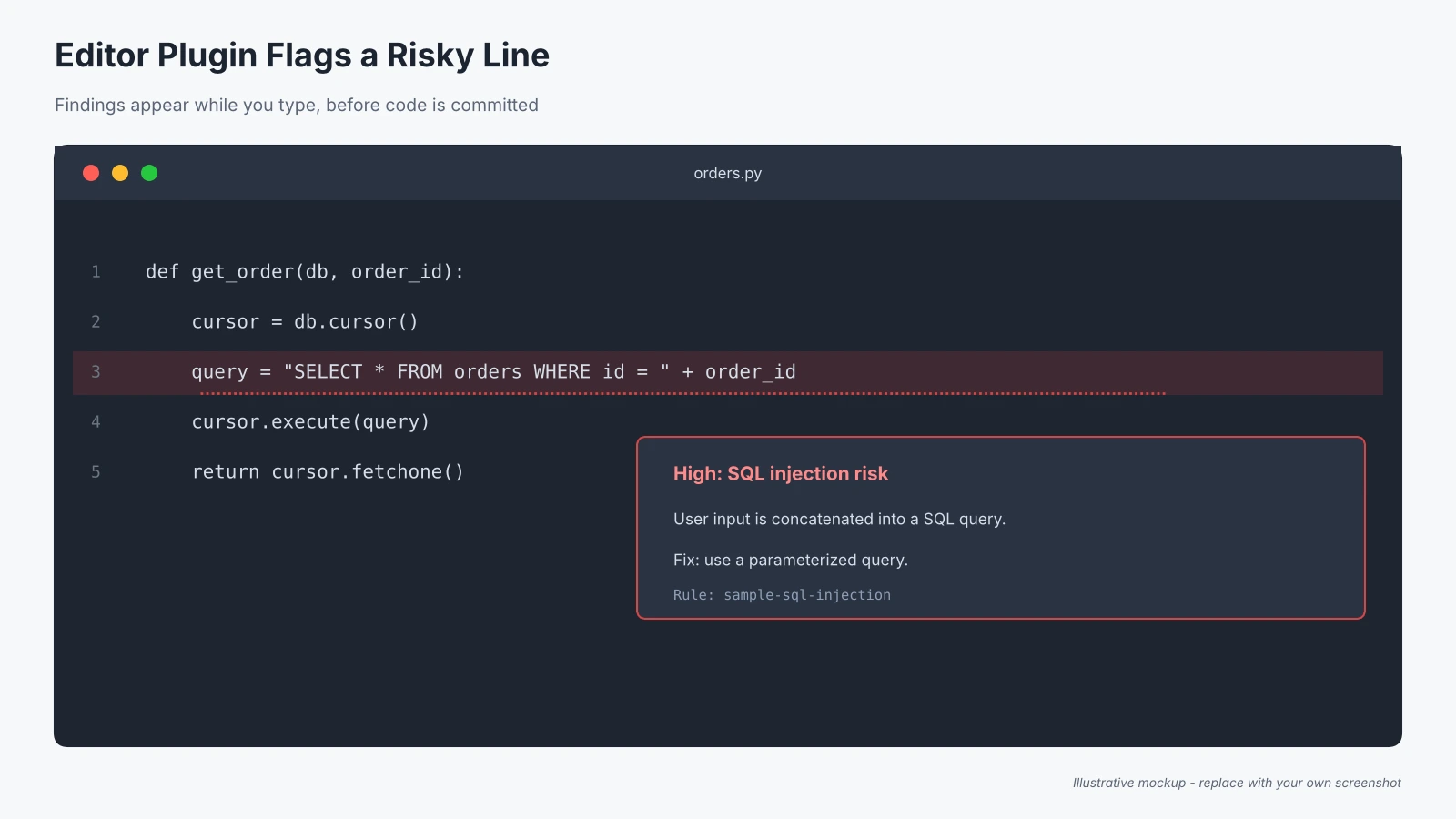
Screenshot 2: Replace with a capture of the plugin flagging an issue inside your IDE.
Step 2: Add a CI job
Fail builds on high-severity findings. QA engineers preparing for an Automation Testing Certification can practise this by adding a scan step to an existing pipeline.
Screenshot 3: Replace with a capture of the passing or failing pipeline run.
Step 3: Review results
Triage findings, suppress confirmed false positives, and track trends.
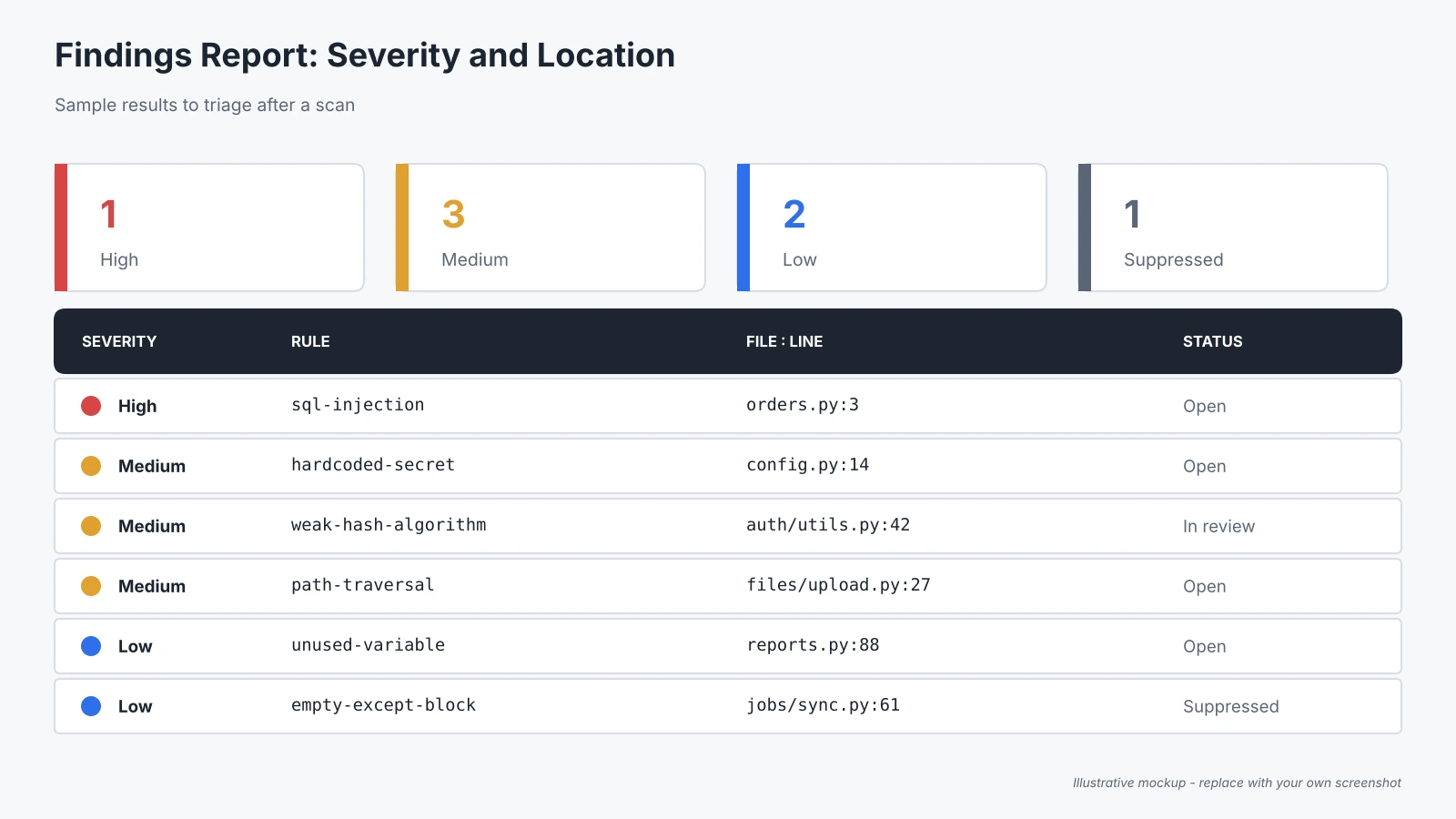
Screenshot 4: Replace with a capture of the findings report showing severity and file location.
Which Tool Should You Pick First?
Every team ships bugs; what separates good teams is when they find them. A flaw caught in the editor costs minutes. The same flaw caught in production can cost customers and trust.
So start small with free static code analysis tools: choose SonarQube Community Build or Semgrep OSS for broad coverage, add CodeQL if your code lives on GitHub, and keep Coverity for safety-critical systems. Run one scan this week, fix the top finding, and let the habit grow.
If you are building a testing career, hands-on practice with static code analysis tools pairs well with an Automation Testing Certification, because it shows you can protect quality before a single test runs.
What Are the Most Common Questions?
1. Is static analysis the same as SAST?
Not exactly. SAST is static analysis focused on security flaws; linters mostly check style and simple bugs.
2. Which tool suits beginners?
ESLint for JavaScript, or SonarQube Community Edition for many languages.
3. Are open-source scanners good enough?
For many teams, yes. Open-source maintainers keep source code analysis tools current for everyday checks; add commercial depth when compliance or complex C/C++ code demands it.
4. Can static analysis replace testing?
No. Static analysis scans miss runtime and logic issues, so pair them with dynamic testing and code review.